


American Airlines
4.822.45K Reviews
App Specs
- Version
- 2026.19
- Updated On
- License
- Free
- Downloads
- 10,000,000+
- Developer
- American Airlines, Inc.
- Categories
- Travel & Local
- Platform
- Android, iOS
Screenshots

 Analysis by AppCompare
I approach airline apps differently from maps or booking tools: the useful test is whether they help me handle the next step of a trip without making me dig through email or search a crowded airport screen. American Airlines is most valuable when I’m flying with this carrier and want flight details, check-in and travel tasks together. It is free, made by American Airlines, Inc., and sits in the travel category. For a first-time user, the simplest route is to install it before travel, find an upcoming trip, and use one practical function—such as checking the itinerary or checking in—before heading to the airport.
What to expect from an airline-specific app
This is not a general-purpose trip planner that compares every airline or builds an itinerary across different carriers. Its focus is American Airlines travel. That narrower scope is a real advantage when your flight is with the airline: the app can keep the relevant trip information and actions close together. It is less useful as a single home for a holiday involving several airlines, trains and hotels, where a general travel organizer may give you a broader view.
The scale suggests that many travelers find it worth keeping installed: it has a 4.6 average from around 111,000 ratings and more than 10 million installs. I treat that as useful context, not a promise that every screen will suit every traveler. The app is rated for everyone, and its current version is 2026.1. It has been available since February 7, 2011, so it is an established airline companion rather than a new experiment.
Getting started without overcomplicating it
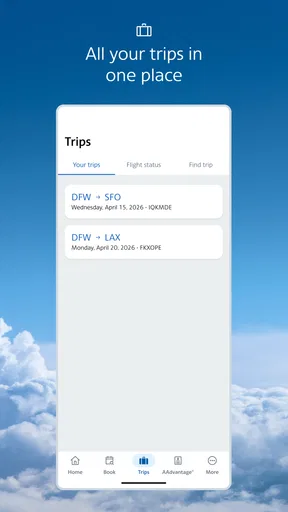
After installing, I’d start by opening the app and looking for the area where a trip can be viewed or managed. Sign-in and booking details are the natural first hurdles: have the information connected to your reservation handy, and use the account associated with the trip if you already have one. If your flight does not appear straight away, check that you are using the right account and that the reservation details match what you received when booking, rather than repeatedly tapping through unrelated menus.
You do not need to learn every feature before travel. First confirm that the flight shown is the right one, then check the itinerary and look for check-in when it becomes available for your trip. That sequence gives a first-time user a clear success point: the flight is visible and the next travel action is easy to find. I would do this at home, not for the first time while balancing a bag in a security line.
Make the first useful action count
For me, the most practical first use is checking the flight status and itinerary before leaving. It creates a quick reference on the phone and gives me a reason to open the app again as the travel day approaches. If check-in is available, handling it there can make the airport routine feel more organized; if you have seat options to review, it is also easier to consider them while you have time than in a rush.
One helpful habit is to revisit the trip when plans are active, rather than relying on an old screenshot or an email buried in your inbox. Airline travel can involve changes to timing or airport details, so the current trip view is a better place to check than a note you saved days ago. I still keep essential information accessible in a way that works for me, but I use the airline app as the place to verify what is current.
Worth Reading Before You Choose

Flipboard Shows What News Apps Must Do Beyond the Feed

Switching to Android Auto Means Rethinking Your Driving Routine

Google Calendar Makes a Crowded Week Easier to Manage

Ludo King Makes the Most of the Minutes Between Plans

Baby Panda World Brings Quick Play to Modern Phones, but Its Game Library Feels Busy

ESPN’s Live Game View Makes Following Close Games Easier
Where it fits beside other travel tools
Compared with a general flight-tracking app, an airline’s own app has a different job. A tracker can be convenient for watching flights across carriers or keeping tabs on someone else’s arrival; this app makes more sense when I need to manage my own American Airlines trip. Compared with an email confirmation, it can bring travel tasks closer to the flight itself. Neither replaces a broad itinerary organizer if my plans span multiple companies, so I would use each tool for what it does best rather than expecting this one app to plan an entire vacation.
That distinction matters for first-time users deciding whether to install it. If you have an American Airlines booking, it is a sensible companion even if you already use a calendar or travel-planning app. If you rarely fly with the airline, or mainly want a neutral tool that tracks many carriers, a general travel app may be a better everyday choice. The American Airlines app is free, which makes trying it for an upcoming flight straightforward, but it earns space on my phone through trip-specific usefulness, not by replacing every other travel tool.
Getting Started with the App
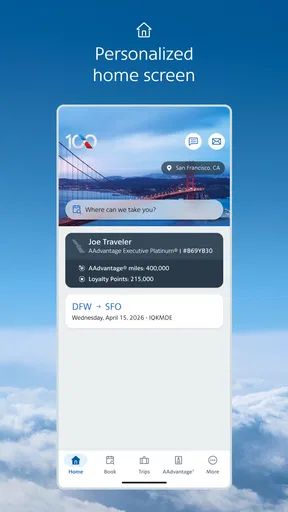
First things first, downloading the American Airlines app is a breeze. Available on both Android and iOS, it’s a quick download, and you’re ready to start exploring its features. The app welcomes you with a clean and intuitive interface. Honestly, even if you’re not tech-savvy, you’ll find it straightforward to navigate.
Your Personal Travel Assistant
Once you’re logged in, the app feels like having your own travel assistant in your pocket. You can easily manage your bookings, check your flight status, and even select your seats. The seat selection feature is particularly nifty, allowing you to choose the perfect spot without any fuss.
One of my favorite parts? The app’s real-time updates. Whether there’s a gate change or a slight delay, the notifications keep you in the loop. No more frantic dashes across the airport because you didn’t hear the announcement.
Boarding Made Effortless
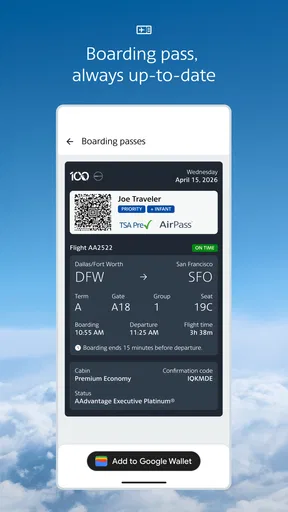
Say goodbye to paper boarding passes. The app generates a digital boarding pass that you can access anytime. Just scan it at the gate, and you’re on your way. It’s not only convenient but also eco-friendly, which is a win-win in my book.
More Than Just Flights
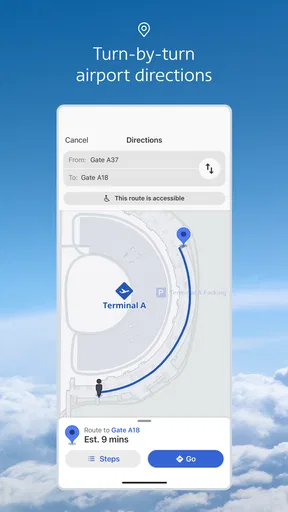
Now, if you’re someone who likes to be well-prepared, you’ll appreciate the additional features. The app allows you to track your luggage, so you’ll know exactly where your bags are. Plus, it provides handy airport maps and information about lounges if you’re looking to relax before a flight.
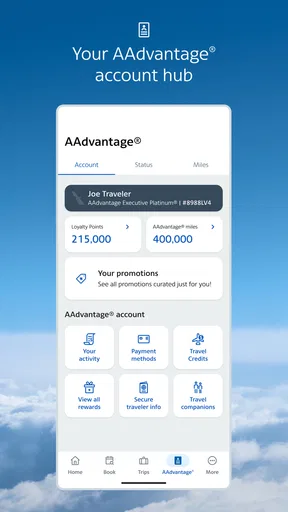
For those who are part of the AAdvantage program, keeping track of your miles is a breeze. You can view your account details and even use your miles for upgrades or rewards directly from the app.
Using it on a real travel day
Picture a familiar situation: I have an early flight, and I am leaving home with a carry-on and one checked bag. Before setting out, I open the trip and check the latest flight details, then use the app’s check-in and digital boarding-pass options as appropriate. At the airport, I can bring up the pass instead of searching for a printed copy, and I can check the app again if I need to confirm a change. The benefit is not that it removes every airport delay; it reduces the small bits of uncertainty that otherwise send me bouncing between messages, email and airport displays.
A useful trade-off is that a digital pass is convenient, but I would not make my phone the only plan for getting through the airport. Keep the phone charged and the pass easy to reach, and follow airport staff instructions if a scanner or process calls for something different. Likewise, notifications are helpful prompts, not a reason to stop checking the trip when plans are changing quickly. I like the app best as a current reference, with ordinary attention to airport announcements still part of the routine.
Handling common moments of confusion
A booking not appearing immediately can be unsettling, especially when the trip is close. I would first verify the account and reservation information, then reopen the trip view rather than assuming the booking has vanished. If the reservation was made through another channel, use the details associated with that booking. The key is to confirm the flight itself before relying on any travel-day feature tied to it.
Another point worth understanding is the difference between seeing a flight and being ready to board. Viewing an itinerary is useful, but it is not the same action as checking in or bringing up a boarding pass. I would treat those as separate steps and make sure the pass is available when it is time to travel. If a seat choice is not what I hoped for, I would revisit the booking options and the trip details rather than assume that selecting a seat guarantees every preference; airline seating can depend on the specific reservation and available choices.
Travel companions also affect how I use it. If I am coordinating with someone else, I make sure we are looking at the correct reservation and not confusing one traveler’s trip with another’s. For a family or group, the app is most useful when the person managing the booking knows which itinerary they are checking. A quick confirmation before leaving home is less stressful than sorting out mismatched details at the gate.
Useful extras, with realistic expectations
The added travel tools can matter most when they solve a specific problem. Luggage tracking is relevant if I have checked a bag and want to follow its status; maps can help me orient myself in an unfamiliar airport; lounge information can be useful when I am considering where to wait. I would explore these when they become relevant instead of spending time learning every section before I have a trip. That keeps the app from feeling like another task in an already busy planning process.
The AAdvantage area is similarly most valuable to travelers who use the program. Seeing account details and handling miles-related options in the same travel environment can be convenient, especially when I am already checking a booking. If I do not collect or use miles, that section is easy to treat as optional rather than a reason to avoid the app. The strongest experience comes from matching features to the trip I actually have, not trying to use every feature just because it is present.
There are limits to keep in mind. An airline app is tied to the airline’s own travel, so it will not provide the independent, all-carrier perspective some travelers want. And while live updates are useful, I still pay attention to airport screens and announcements; phones can be muted, connectivity can be inconvenient, and last-minute travel decisions deserve a second look. The app can make information easier to reach, but it cannot make a delayed flight or a crowded terminal disappear.
Who will get the most from it
I would recommend it most to someone with an upcoming American Airlines flight, especially a first-time flyer who wants one place to check the trip, complete check-in and bring up a boarding pass. It also suits frequent customers who want their bookings and AAdvantage details close at hand. A traveler who has already built a multi-airline itinerary may still find it useful for the American Airlines portion, but should keep the broader organizer they use for the rest of the journey.
On the other hand, I would skip installing it just to monitor flights in general if I do not expect to fly with this airline. A neutral flight tracker or a general travel organizer is likely more useful for that purpose. I would also avoid treating it as a complete substitute for preparation: confirm the booking, keep an eye on travel updates, and know how to access the pass before reaching the gate. Those small habits make the app’s convenience more dependable.
Final Thoughts
In conclusion, the American Airlines app is a must-have for anyone flying with them. It’s user-friendly, packed with features, and honestly makes the travel experience so much better. Whether you’re jetting off for business or pleasure, having this app will undoubtedly make your journey more enjoyable. Give it a try, and you might just find yourself wondering how you ever traveled without it!
Pros
- User-friendly interface for easy navigation.
- Real-time flight updates and notifications.
- Simple mobile check-in process.
- Access to exclusive deals and offers.
- Integration with Apple Wallet for boarding passes.
Cons
- Occasional app crashes reported by users.
- Limited features without internet connection.
- Slow customer service response time.
- Frequent login requirements can be inconvenient.
- Some features are hidden in submenus.
FAQs for American Airlines
What features does the American Airlines app offer?
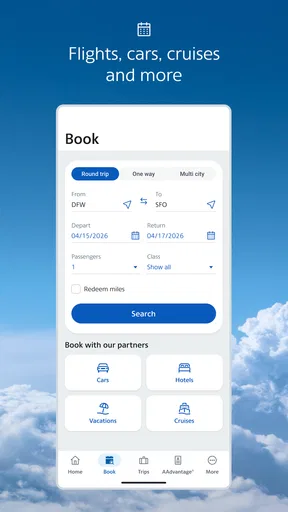
The American Airlines app provides a wide range of features designed to enhance your travel experience. You can book and manage flights, check-in, access your boarding pass, and receive real-time flight updates. Additionally, the app offers a map of the airport terminal, baggage tracking, and the ability to upgrade your seat or purchase additional services.
Is the American Airlines app free to download and use?
Yes, the American Airlines app is free to download on both Android and iOS devices. While downloading and using the app incurs no cost, some features like in-app purchases for seat upgrades or additional services may require payment. Ensure your device is connected to Wi-Fi or a mobile network to avoid data charges.
Can I access my loyalty program details through the app?
Absolutely! The American Airlines app allows you to access your AAdvantage loyalty program details. You can view your mileage balance, keep track of your progress toward elite status, and see any upcoming milestones. The app also allows you to redeem miles for flights, upgrades, and other rewards, making it a convenient tool for frequent flyers.
How reliable is the American Airlines app for real-time updates?
The American Airlines app is highly reliable for providing real-time updates. It offers notifications for gate changes, delays, and cancellations directly to your device. While the app generally provides timely information, it is always advisable to verify updates through airport monitors or customer service, especially during inclement weather or high-traffic periods.
What should I do if I encounter issues with the app?
If you experience any issues with the American Airlines app, there are several steps you can take. First, ensure that your app is updated to the latest version. If problems persist, try uninstalling and reinstalling the app. For further assistance, you can contact American Airlines customer service through the app or visit their website for support options.


